
Shopify shipping options by market: what changes and what to test
For items shipping now, Shopify Markets charges the highest matching flat rate within an option. Checkout quoted $11 with both snowboards on Standard and $21 with one on Express.
In this guide
Where did my Shopify shipping profiles go?
Open Settings > Shipping and delivery. A General profile with products, zones and rates identifies the profile setup. Shipping options grouped by market identifies the upgraded setup. The Markets sidebar item can appear in either system. Shopify’s migration guide
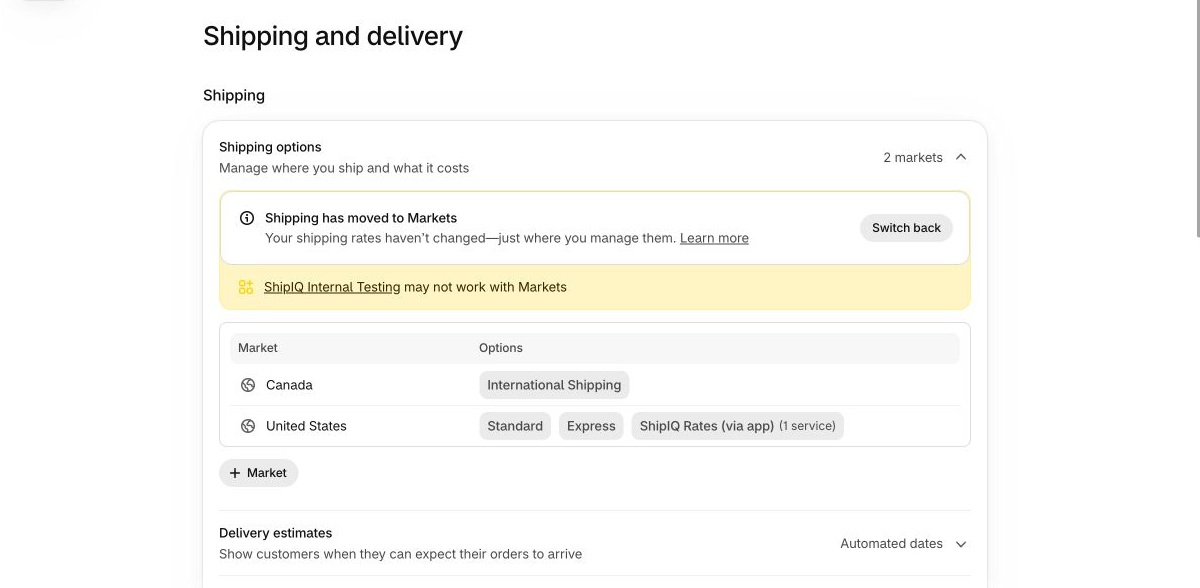
In our upgraded development store, the admin said Shipping has moved to Markets. The US market offered Standard, Express and an app rate. Canada had an International Shipping option. Our profile-based store still showed General profile. See the upgraded admin
When does Shopify charge the highest rate, and when do rates add up?
Standard is the choice a shopper sees. The rates inside Standard can vary by product or origin. In Markets, open the destination’s shipping options to see which rates belong together. At checkout, expand the shipment details and check the service selected on each shipment. Shopify’s combined-rate rules
| What applies to this cart? | What to expect at checkout |
|---|---|
Matching flat or order-amount rates inside one option for items shipping now | The highest eligible rate for that option is charged once. A second shipment covered by it can show Included. |
A buyer uses Standard on one shipment and Express on another | The selected options add together. Simply offering Standard and Express as alternatives for a single shipment does not add them together. |
Weight-based rates across two shipments | Each shipment falls into its own weight band. Add the resulting prices. |
Carrier-calculated, app-calculated or app-provided rates across shipments | Each shipment is quoted separately. Check each selected service and the sum charged. |
A preorder and an item that ships immediately | Their rates add even when both use the same shipping option. Test this cart separately if you take preorders. |
What shoppers saw in our market-based checkout tests
Two products, one shipping option. Did checkout charge $11 or $17?
Checkout quoted $11. On November 16, 2026, we saved two flat rates inside Standard (cart test) under Markets > United States > Shipping in a development store already using Markets. The $6 rate covered Automated Collection and the $11 rate covered Hydrogen. Both used the same eligible origins and a 3–5 business day delivery window.
The Complete Snowboard (Ice) qualified only for the $6 rate. The Collection Snowboard: Oxygen qualified only for $11. Each board went through checkout alone, then together, using the same Phoenix, Arizona 85003 address, USD and no discount. We stopped before payment.
We selected Standard (cart test) by name. It had no free-shipping threshold. The store’s other option called Standard was free for these baskets.
| Cart and service selected | Merchandise | Shipping | Checkout total |
|---|---|---|---|
A. Ice alone, Standard (cart test) | $699.95 | $6.00 | $705.95 |
B. Oxygen alone, Standard (cart test) | $1,025.00 | $11.00 | $1,036.00 |
A + B, Standard (cart test) on both shipments | $1,724.95 | $11.00 | $1,735.95 |
Same A + B cart, Express on the Oxygen shipment only | $1,724.95 | $21.00 | $1,745.95 |
Where the $10 difference came from. With Standard (cart test) on both shipments, More shipping options showed Ice’s $6 crossed out and marked Included. Oxygen carried the $11 charge. We then kept Ice on its $6 service and switched only Oxygen to $15 Express. Checkout displayed Custom, with $6 and $15 adding to $21. Ask which service the shopper selected for each shipment when you investigate a different total.
For comparison, our October 31 test used the older profile system in another development store. Shipping for two $25 products in that test was $12 across two profiles and $6 under one shared profile. Profile experiment with both checkout captures
Which service became free when the cart passed $70?
Only Standard became free. On November 16, 2026, our US market offered $8 Standard with a $70 minimum for free shipping, $15 Express and an app service called QA Markets Delivery. Standard and Express covered all products at Shop location.
We checked out with Selling Plans Ski Wax as a one-time purchase at $24.95 USD per unit. One unit fell below $70. Three units came to $74.85. Both checkouts used the same Phoenix, Arizona 85003 address and no discount. We stopped at the shipping step.
| Phoenix checkout, USD | 1 unit | 3 units |
|---|---|---|
Merchandise, no discount | $24.95 | $74.85 |
Standard | $8.00 | FREE |
QA Markets Delivery, app quote | $7.25 | $7.25 |
Express | $15.00 | $15.00 |
Total with Standard selected | $32.95 | $74.85 |
Checkout initially selected the $7.25 app service on the one-unit cart, for a $32.20 total. We selected Standard for both baskets. On the $74.85 cart, shoppers could still choose the $7.25 app service or $15 Express. Test the exact threshold and any discounts in your own store.
ShipIQ is Shipping Guru’s app. Our admin flagged the internal app for possible incompatibility. ShipIQ Rates (via app) returned its quoted service for these two Phoenix carts. Other products, destinations and fulfillment locations need their own checkout tests.
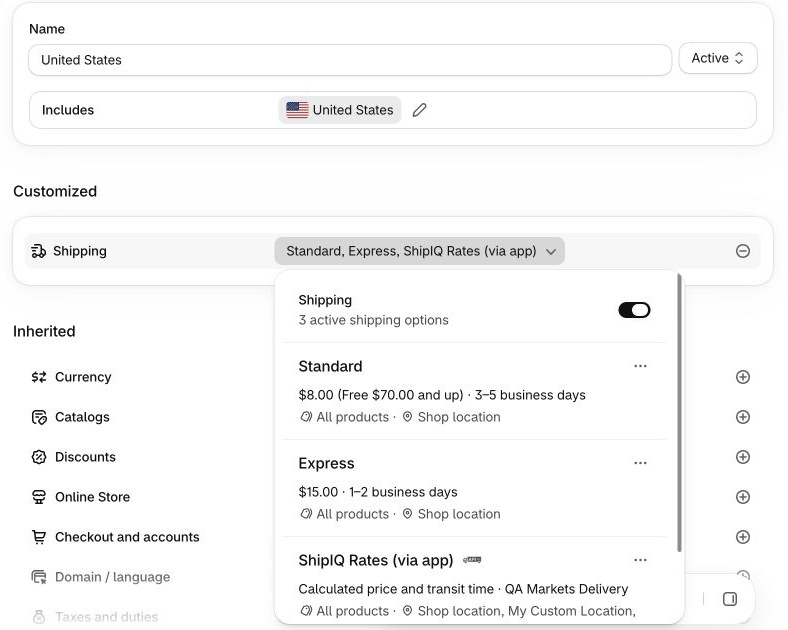
The shipping section of the US market. “Free $70.00 and up” belongs to Standard. Save this view before deciding which checkout services should become free.
Canada had a $30 option in the admin. Could a shopper select it?
In the same development store, Canada was active and had its own catalog. Its International Shipping option showed $30.00, All products and No locations. In the storefront theme preview set to Canada, the same three units were $23.70 USD each, a $71.10 USD merchandise subtotal. At checkout, the delivery-country selector offered only the United States. We could not enter a Canadian destination or obtain a Canadian shipping quote.
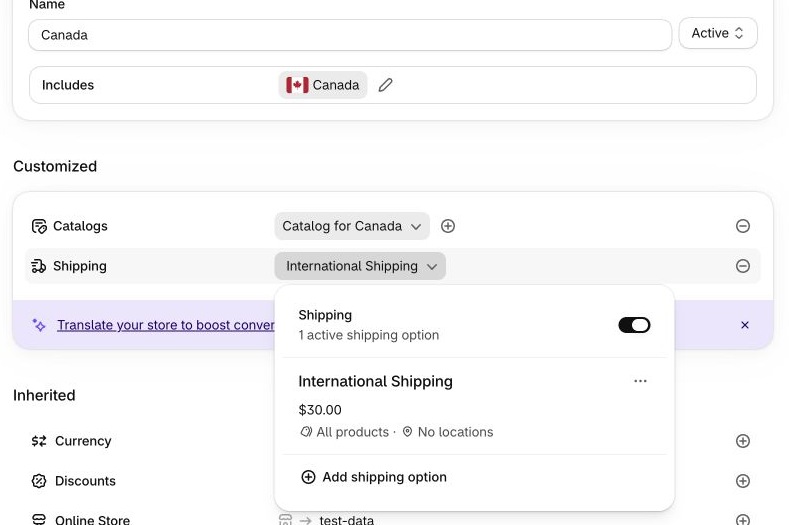
We recorded this case as blocked. The $30 was a saved rate. The $71.10 was the storefront merchandise subtotal. Neither amount establishes what a buyer in Canada would pay for delivery.
If your store shows the same result, open Ships from and check for a location that stocks the variant and can fulfill online orders. Confirm that the variant is available in the destination market’s catalog. Then start a fresh checkout for a supported Canadian address and record the service and charge. We left the development-store settings intact, so this test identifies a missing origin to investigate without assigning it as the sole cause.
How to test shipping options by market at checkout
Choose two variants with meaningfully different shipping requirements, such as a standard item and a bulky item. Use a permitted test address with a known postcode. Write down the service and price your published policy promises for each basket. If the store still uses profiles, save the current result now so you can run the identical cart after migration. If it has already moved, leave the old result blank unless you have a dated record.
Start each test from a new storefront checkout. Enter the delivery address and wait for shipping methods. Expand More shipping options if it appears. Record the selected service, shipment count, shipping charge and currency. Capture a cropped image of the breakdown. Stop before payment. An abandoned checkout can retain old rates. Shopify’s checkout testing guidance
| Cart to test | What to hold steady or change | What counts as a pass |
|---|---|---|
| Same destination, no discount, same currency. Use one unit of each. | Each item has the intended service alone. The pair charges the intended total under the applicable combination rule. |
| Use distinct variants stocked at separate eligible origins. Check the actual shipment breakdown. | The origins and service choices make sense. A covered shipment reads Included where applicable. |
| Keep the cart fixed. Change only the address to a second served region, then to one you intentionally exclude. | Each served region offers its advertised service. The excluded address cannot use it. Check both parent and child markets if they differ. |
| For a $50 USD minimum, try $49.99, $50.00 and $50.01. Repeat a qualifying basket with a real promotion applied. | The advertised service becomes free at the intended point. The rate below the boundary still works. |
| Keep the parcel weight, dimensions, origin and postcode fixed. Try one shipment before trying two. | The intended provider returns an eligible service. A flat backup alone does not verify a live quote. |
| Test each alone, then combine them with the same destination. | The delivery timing and combined charge match the policy you show before checkout. |
Download the editable checkout worksheet (CSV). It has separate lines for the individual controls, mixed cart, different destinations, discount boundaries, shipment choices and app rates. Fill in your promised result first. Keep a dated observation for each system and rerun a failed case after changing one setting. Download the shipping options by market test worksheet
What to look for after your store moves to Markets
Shopify’s published rollout started opt-in on October 1, 2026, with July 1, 2027 as its completion target. Your admin shows where your store stands today. A store that depends on a shipping app may move later while the app provider updates its integration. Shopify’s rollout dates · Shopify’s current eligibility guidance Eligible stores may see Get early access before they move.
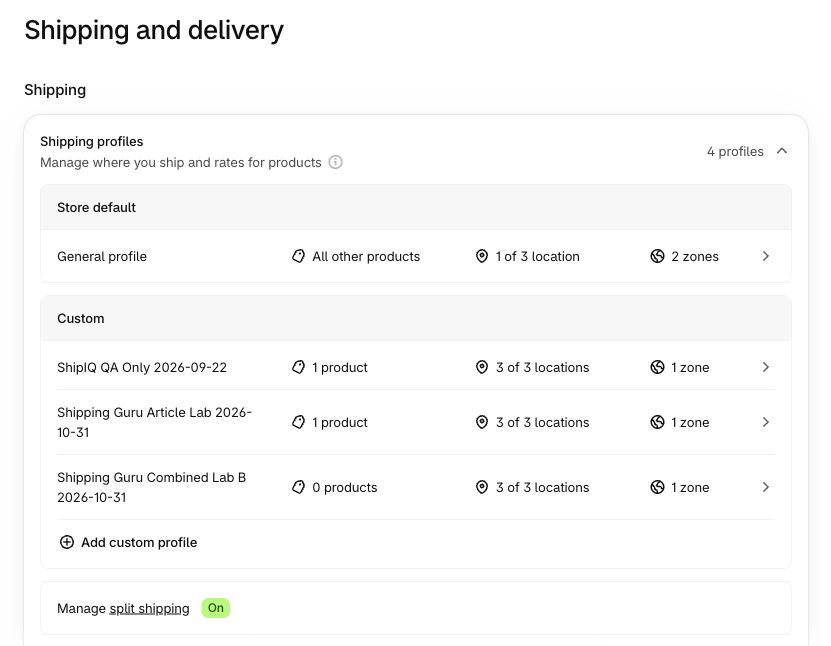
November 16, 2026, in our profile-based development store. General profile and three custom profiles identify the system in use. Split shipping was already on here.
Shopify migrates existing rates automatically and turns on split shipping for upgraded stores. The old on/off setting no longer applies. When a cart needs multiple shipments, check the price of each selection and the shipping total. Shopify’s split shipping guidance
Open Markets, select the destination market and click Shipping. Pick the option your customers usually select, such as Standard. Check these four things before editing it. Shopify’s market setup instructions
| What you used to check | Where to look now | A useful first check |
|---|---|---|
Countries or provinces in a shipping zone | The destination market and any sub-region markets | Check one address that should qualify and one just outside your delivery area. A child market can inherit its parent’s options. |
Products assigned to a custom profile | Applies to on the rate, including unpublished collections with a [Shipping] prefix | Find the actual variant you sell. An oversized variant of an ordinary product can have its own shipping needs. |
Locations grouped inside a profile | Ships from on the rate | Find the warehouse that holds the variant. Check whether its stock can fulfill online orders. |
Several rates called Standard | Rates under the migrated shipping option | Compare prices and conditions. Shopify can consolidate matching names into one option. |
Staff who previously managed rates may need the store owner to add the Markets permission to their role. Shopify does not grant it automatically during the upgrade. Before editing an inherited option, identify which other markets use it. Check Customize on the child market if only that destination needs a different policy. Shopify’s upgrade details · How market inheritance works
What to fix when a checkout test fails
A mixed cart costs more or less than your policy promises
Check the two items alone. If those are correct, expand the shipment details for the mixed cart and write down the selected option for each shipment. In Markets, inspect the matching collection, Ships from condition and rate type. Two separate flat options can explain a sum. A single option covering two flat rates can explain a smaller charge. If the mixed basket alone is wrong, fix the grouping or eligibility and repeat all three carts. Cutting a base price also changes the single-item orders that already passed.
If the price is right but the buyer sees an unexpected extra choice, check for overlapping markets. A Canadian address included in two markets can receive options from both. Trace the unexpected service to its market before changing the rate for every customer. Shopify’s market inheritance rules
A country or province gets no delivery option
Start with the same SKU and a known working address. Switch only the destination. If the failure follows the address, inspect active market coverage, inherited shipping and any province-specific market created during migration. If it follows one product across both addresses, check the variant’s shipping collection, inventory and eligible origin. A cart outside your service area should stay blocked. For a supported destination that fails, follow the Shipping not available checkout checks.
Free shipping disappears when a shopper enters a discount
Find what grants free shipping. A migrated rate may bring an option’s price to zero or appear as a separate free choice. A free-shipping code or automatic discount has its own settings under Discounts. For that discount’s minimum, Shopify uses product prices after combinable discounts and excludes tax. For example, a $50 basket reduced to $45 falls below a $50 minimum. Record both subtotals, selected currency and rule type before editing a threshold. Shopify’s free-shipping discount rules · Our checkout test with and without a discount
A shipping app is connected but its rate is missing
Open Settings > Shipping and delivery and check for an app compatibility notice. In the affected market, inspect whether the provider’s option is active. Recreate one eligible shipment with the same package and postcode. Note whether checkout shows the expected service, only a fallback, or no service. App-managed prices and rules may need changing in the app itself. Send the provider the time, market, variants, origins, package, expected service and a cropped checkout result so they can look up the quote. Shopify’s app migration guidance · Shopify live-rate troubleshooting and evidence
Can I switch back to shipping profiles?
Open Settings > Shipping and delivery to see whether your store still has a Switch back option. Shopify’s warning says reverting restores your previous setup, permanently removes shipping edits made after the upgrade, and removes collections and sub-region markets created by the upgrade. Before confirming, save your current rates, product groups and destination rules and read the warning in your own admin. Once the window closes, edit the affected option in Markets or send the failing cart to Shopify Support. Shopify’s warning under “Switching back to shipping profiles”
Still have a cart you can’t explain? Send Shipping Guru the two variants, destination postcode, selected services and expected shipping charge. We can use that exact basket to review your Shopify shipping setup and show you which setting controls the price and how to verify a correction. Request a shipping review
Official references
Shopify documentation checked November 16, 2026.
- Shopify’s rollout timeline for shipping options by market
- Upgrading from shipping profiles, including app compatibility and switching back
- Market inheritance, shipping rate types and checkout calculations
- Setting up and testing a market’s shipping options
- Split shipments, included rates and preorder exceptions
- Free shipping discount eligibility
- Troubleshooting and testing shipping rates

Written by
Asim Ahmad
Asim works on Shopify store development, shipping setup, migrations, and app integrations. At Shipping Guru, his guides connect checkout symptoms to the settings merchants need to inspect, with original test evidence where available.